Track your AI limits
in one place
Tally is a macOS menubar app for tracking Claude, OpenAI/Codex, and Gemini usage. Monitor personal subscription limits, API spend, and token activity without living in provider dashboards.
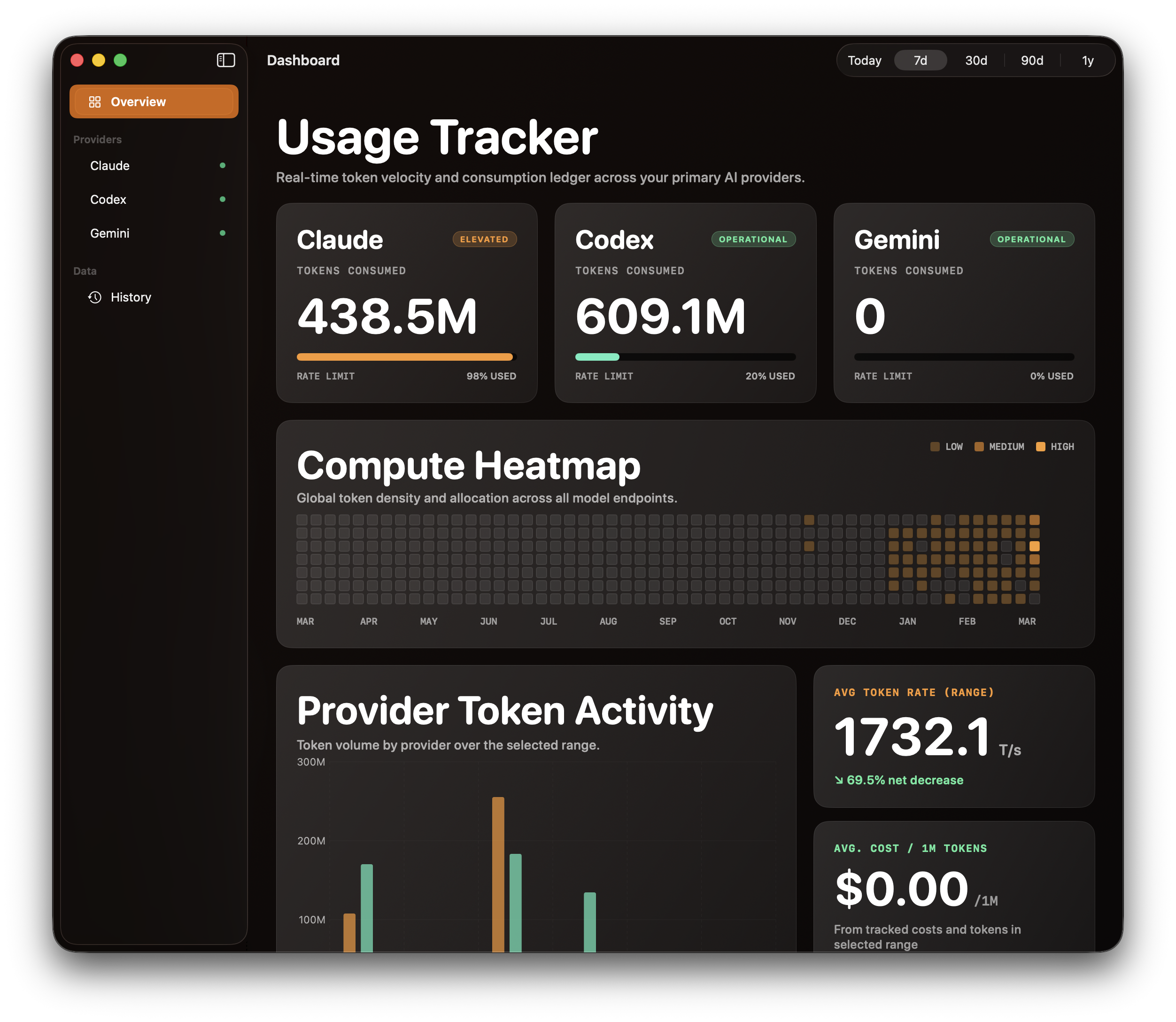
Everything you need to stay in control
Track AI usage limits, API spend, token activity, and session history across Claude, OpenAI/Codex, and Gemini from one native macOS app.
Multi-Provider
3 providersTrack Claude, OpenAI/Codex, and Google Gemini from a single menubar app. No switching between dashboards.
Personal & API Modes
Dual modeTrack your Claude Pro/Max subscription limits (5-hour and 7-day windows), or monitor API billing and token spend for developer use.
Multi-Account
Up to 10Track up to 10 accounts across providers. Separate work and personal usage with labeled accounts, each with independent polling.
Session History
Local dataReads your local Claude Code and Codex session files to backfill up to a year of token usage history. See trends from day one.
Activity Heatmap
52 weeksGitHub-style contribution chart shows your AI usage patterns over the past year. See exactly which days you pushed the limits.
Usage Alerts
Real-timeCountdown timers when you hit 100%. Menubar icon changes to a warning triangle. Red-tinted cards make limits impossible to miss.
Menubar Native
macOSLives in your macOS menubar with dark and light theme support. One click to see all your usage. No browser tabs, no logins.
Privacy First
Local onlyAll data stays on your Mac. Session files read locally, credentials in Keychain. Zero telemetry, zero tracking, zero cloud.
See it in action
Real screenshots from the app across menubar, dashboard, and provider detail views.
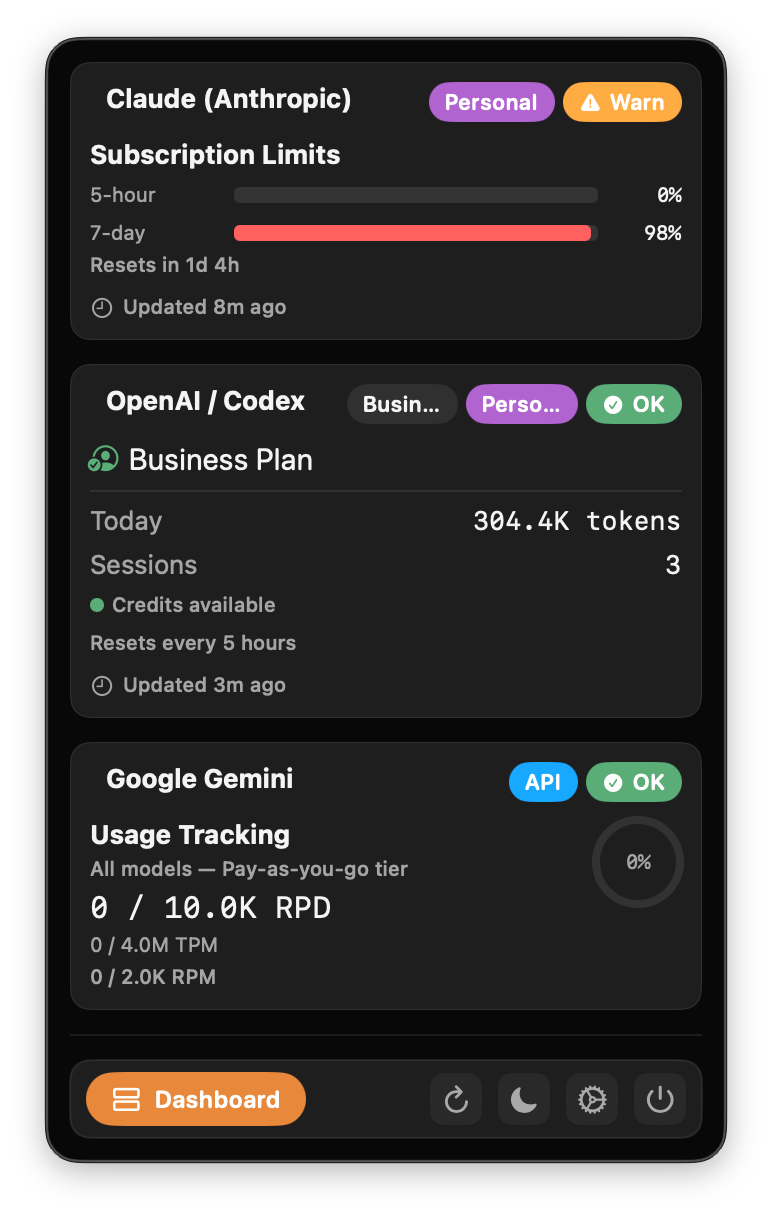
Menubar Popover
See all provider usage at a glance from the macOS menu bar.
Up and running in 30 seconds
No accounts to create. No browser extensions. Just install and go.
Install
Download the .pkg installer and drag Tally to your Applications folder. It launches as a menubar app — no dock icon, no clutter.
Configure
Choose Personal mode to auto-detect your Claude Code or Codex CLI credentials. Or switch to API mode and paste your developer key.
Monitor
Click the menubar icon to see all your providers at a glance. Utilization bars, token counts, cost tracking, and rate limit gauges — all in one popover.
Three providers, one view
Tally helps you track Claude usage, OpenAI and Codex API usage, and Gemini API limits with provider-specific personal and developer modes.

Claude (Anthropic)
- 5-hour utilization percentage
- 7-day utilization percentage
- Reset countdown timers
- Auto-detects Claude Code credentials
- Token usage (input/output/cached)
- Cost tracking (daily totals)
- Hourly usage breakdown
- Requires Admin API key


OpenAI / Codex
- Plan detection (Free/Plus/Pro/Business)
- Daily token usage from session files
- Session count tracking
- Credit availability status
- Token usage and cost reporting
- Rate limit headers (RPM/TPM)
- Model-level breakdown
- Standard API key


Google Gemini
- Tier-based rate limits (RPM/TPM/RPD)
- Free, Pay-as-you-go, and Scale tiers
- Key validation and health check
- API key from Google AI Studio
Frequently asked questions
Quick answers about tracking Claude, OpenAI/Codex, and Gemini usage with Tally on macOS.
What is Tally?
Tally is a macOS menubar app for tracking AI usage across Claude, OpenAI/Codex, and Gemini. It shows personal subscription limits, API usage, token activity, and spend in one place.
Can Tally track Claude usage limits on macOS?
Yes. Tally can read Claude personal-mode credentials already stored on your Mac and show Claude usage windows, reset timers, and usage status directly from the menubar.
Can Tally monitor OpenAI and Codex API usage?
Yes. In developer mode, Tally tracks OpenAI and Codex API usage, token consumption, model-level breakdowns, and cost data using your saved API key.
Does Tally support Google Gemini?
Yes. Tally supports Gemini API monitoring, including usage tracking, rate-limit visibility, and account-level configuration for Gemini keys.
Does Tally keep my data local?
Yes. Tally is designed to keep credentials in macOS Keychain and use local session data where available. The app is positioned as a privacy-first, local macOS utility.
Can I track both personal and developer accounts?
Yes. Tally supports personal-mode tracking for supported providers and developer-mode tracking for API accounts, so you can separate personal usage from work or project API usage.
Do I need to keep provider dashboards open?
No. Tally is meant to reduce that overhead by keeping usage, limits, and spend visible from your macOS menubar instead of requiring multiple provider dashboards.
Which providers and modes does Tally support?
Tally supports Claude personal and API tracking, OpenAI/Codex personal and API tracking, and Gemini API tracking on macOS.
Is Tally only for developers?
No. Tally is useful for both individual users watching personal subscription limits and developers or teams monitoring API usage and spend.
Download Tally
Available soon on macOS. Join early access to get the latest build.